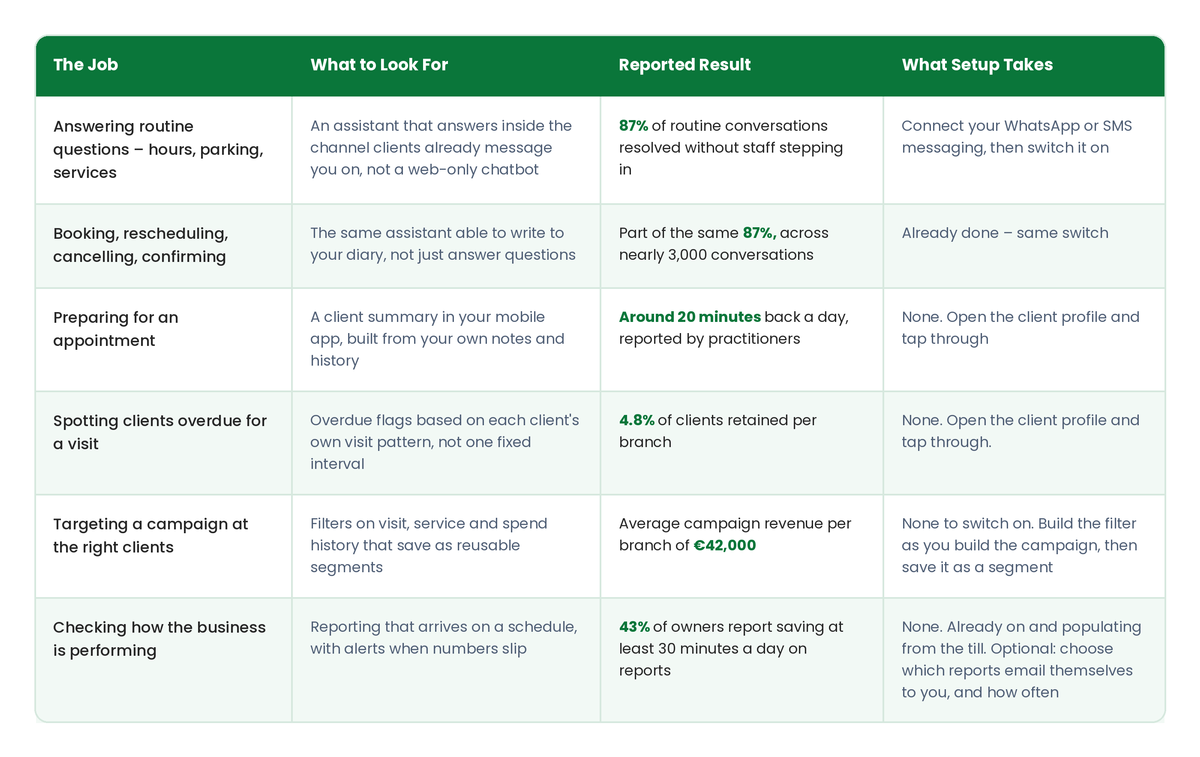
Two things stand out.
First, setup is generally a short, front-loaded process. The most time-consuming task on the list is connecting your messaging channel, and a well-built system will allow you to monitor AI-generated replies in test mode for a week before clients ever see them.
Second, the easiest features to adopt are often those already built into tools your team uses every day.
Of course, none of these tools can compensate for an outdated or incomplete client database.
Every task in that table relies on your existing records. Missing phone numbers, incomplete service notes, and duplicate client profiles can limit what AI is able to deliver.
Before switching anything on, it's worth spending an hour reviewing the quality of your data.
How Much of Your Front Desk Can AI Actually Handle?
The answer is most of it, but not all. And that distinction matters.
According to Phorest's data, 87% of routine client conversations were resolved without a team member stepping in, across nearly 3,000 conversations. The remaining 13% were passed to a person, either because the situation required human judgment or because the client requested it.
Much of what AI handles is the everyday communication that fills a salon, spa, or clinic's inbox: opening hours, parking information, service availability, and common appointment requests such as:
- Booking
- Rescheduling
- Cancelling
- Confirming
But the remaining 13% is just as important.
Think about a colour correction that didn't go as planned, a complaint, an unusual booking request, or a client asking for a stylist who isn't available that week.
These situations require more than an automated response.
A well-designed system recognizes when a conversation needs human attention and passes it along rather than attempting to resolve something it shouldn't. The same applies when a client simply asks to speak with a person.
That handoff isn't a weakness. It's an important part of how the system should work.
An AI tool claiming to resolve 100% of conversations could end up handling some of them poorly, particularly the more sensitive interactions that influence whether a client returns.
AI doesn't eliminate the need for a front desk. Instead, it changes how your front desk team spends its time.
One feature worth looking for when evaluating a system is a test mode. This allows owners to review suggested AI responses for a week while their team continues answering messages as usual, then activate the feature once they're comfortable with its performance.
What Changes in the Five Minutes Before an Appointment?
Practitioners using AI appointment summaries report saving around 20 minutes a day on appointment preparation.
The process itself is simple: open a client's profile on your phone and review a summary of their notes, previous services, product purchases, and no-show history before they arrive.
Across Phorest's client base, more than 24,000 of these summaries are generated every month.
But the real opportunity goes beyond the time saved.
Consider a stylist who notices that a client has stretched their last two appointments from six weeks to nine. That information creates an opportunity to talk about their maintenance schedule.
Or a practitioner who sees that a client purchased a particular treatment twice before stopping. Knowing that history makes it easier to start a relevant conversation without it feeling like a sales pitch.
These are the kinds of interactions that can influence visit frequency and average client spend. And they're much more likely to happen when practitioners have the information before the appointment begins.
AI summaries can also help create a more consistent guest experience across your team. Your newest practitioner and your most experienced team member can begin an appointment with access to the same client information.
However, the quality of those summaries depends entirely on the information your team records.
A business where practitioners consistently add a couple of useful notes after each appointment will get more value from the feature than one where client records are largely empty.
For teams already documenting appointments, AI gives those notes another practical purpose.
How Do You Turn Time Saved Into Revenue?
Saving time creates capacity, but capacity doesn't automatically translate into revenue.
The opportunity comes from how your team uses that time, particularly when it comes to encouraging repeat visits and delivering more targeted marketing.
Getting Clients Back on Schedule
Effective client reminders depend on understanding individual booking patterns.
For example, a client who visits every five weeks for a haircut but every twelve weeks for colour has two very different appointment schedules.
A blanket six-week reminder might arrive too late for one service and too early for the other.
More sophisticated systems use each client's visit history to identify when they're overdue for a specific service. In Phorest's case, this capability has been operating for years, predating its newer AI features.
Making Marketing More Relevant
The second opportunity is reaching the right clients with the right message.
Rather than sending the same campaign to your entire database, you can create more specific groups, such as:
- Clients who purchased a treatment once but haven't purchased it again
- Clients who consistently book with one particular stylist
- Clients who haven't visited since March
Look for systems that allow you to save these segments so you can build a targeted audience once and use it again.
There are examples of significant results from this approach.
Togninis has reported a 10,000% return on SMS, while salon[718] has generated $300,000 in revenue from SMS.
Both are outliers. They demonstrate what's possible with a well-maintained database and consistent use of the tools, not what every salon, spa, or clinic should expect in its first quarter.
The important thing is to use this additional capacity thoughtfully.
Sending more messages to everyone isn't necessarily better. Over time, it may simply teach clients to ignore them.
The goal is to send fewer, more relevant messages to a carefully selected audience.
Which Numbers Should You Check Before and After You Switch It On?
Before introducing a new AI tool, record five key performance indicators. Then review those same numbers 90 days later.
- Client retention and rebooking rate: Two of the slower-moving metrics, but among the most important.
- Average visit frequency: Helps reveal whether better appointment preparation is translating into more consistent visits.
- Average client spend: Another way to evaluate the impact of those conversations.
- Client messages answered manually each week: A direct measure of how much routine communication AI is handling.
- Revenue attributable to campaigns: The clearest way to assess whether your marketing targeting has improved.
- Ninety days is a useful timeframe for this comparison.
Retention and visit frequency generally move too slowly to draw meaningful conclusions after just 30 days. Wait much longer than a quarter, and other changes in the business can make it harder to identify what influenced the results.
All five metrics are available through Phorest's reporting.
For many salons, spas, and clinics, the challenge isn't a lack of data. It's that no one recorded the starting point.
Without that baseline, it's difficult to determine whether a new tool has actually paid for itself.
Building a Time Audit for Your Salon, Spa, or Clinic
Getting 20 minutes back each day can make the workday a little less stressful. But using those same 20 minutes for meaningful rebooking conversations can contribute to a stronger retention strategy.
The software determines how much time you save. What you do with that time determines its value.
If you'd like to see how these tools work in practice, the figures shared throughout this article come from Phorest, where each of the tasks discussed connects to a specific feature.
Front Desk AI manages routine client messages through Phorest Chat on WhatsApp or SMS, with a test mode that allows you to review responses before clients see them. Cheat Sheet AI generates appointment summaries in PhorestGo. Client Reconnect identifies when clients fall outside their usual booking patterns for specific services, while the Marketing Suite allows you to create and save targeted client segments.
The next challenge is deciding how to put those capabilities to work in your own business.
That's often where conversations with other salon, spa, and clinic owners become just as valuable as the technology itself.
Continue the Conversation at Phorest Summit 2027
Phorest Summit 2027 takes place January 24–25 at the Gleneagle Arena in Killarney, under the theme Beyond: What the Future Holds in Our Industry.
Attendees will get the first hands-on look at new Phorest features, including AI tools, before their general release.
Front Desk AI and Cheat Sheet AI followed that same path in January 2026, when both were made available to Summit attendees before rolling out more widely.
For salon, spa, and clinic owners looking to explore what's next, the event offers an opportunity to see emerging tools in action and learn alongside other industry professionals.
Tickets and the speaker line-up are HERE.